40 LangChain Interview Questions and Answers for Freshers, Intermediate & Advanced (2026 Guide)
Prepare with 45+ LangChain interview questions and answers, coding examples, RAG, LangGraph, and expert tips for freshers and experienced developers.
Explore moreArtificial intelligence applications are rapidly growing, and LangChain is now one of the most popular frameworks for developing LLM-powered apps. From AI chatbots and document Q&A systems to autonomous agents and Retrieval-Augmented Generation (RAG), businesses are increasingly asking for developers with LangChain knowledge.
LangChain has become one of the most popular frameworks for developing AI agents and LLM-powered apps. As of 2026, the project has 139,000+ GitHub stars, 23,000+ forks, and more than 1,200 releases, indicating rapid growth and a vibrant open-source community. Its JavaScript/TypeScript package has 2.3+ million monthly npm downloads, while the Python package has 313+ million downloads in the last 30 days and 2.5+ billion lifetime downloads from PyPI. These figures indicate LangChain's widespread usage by startups, corporations, and AI developers globally.
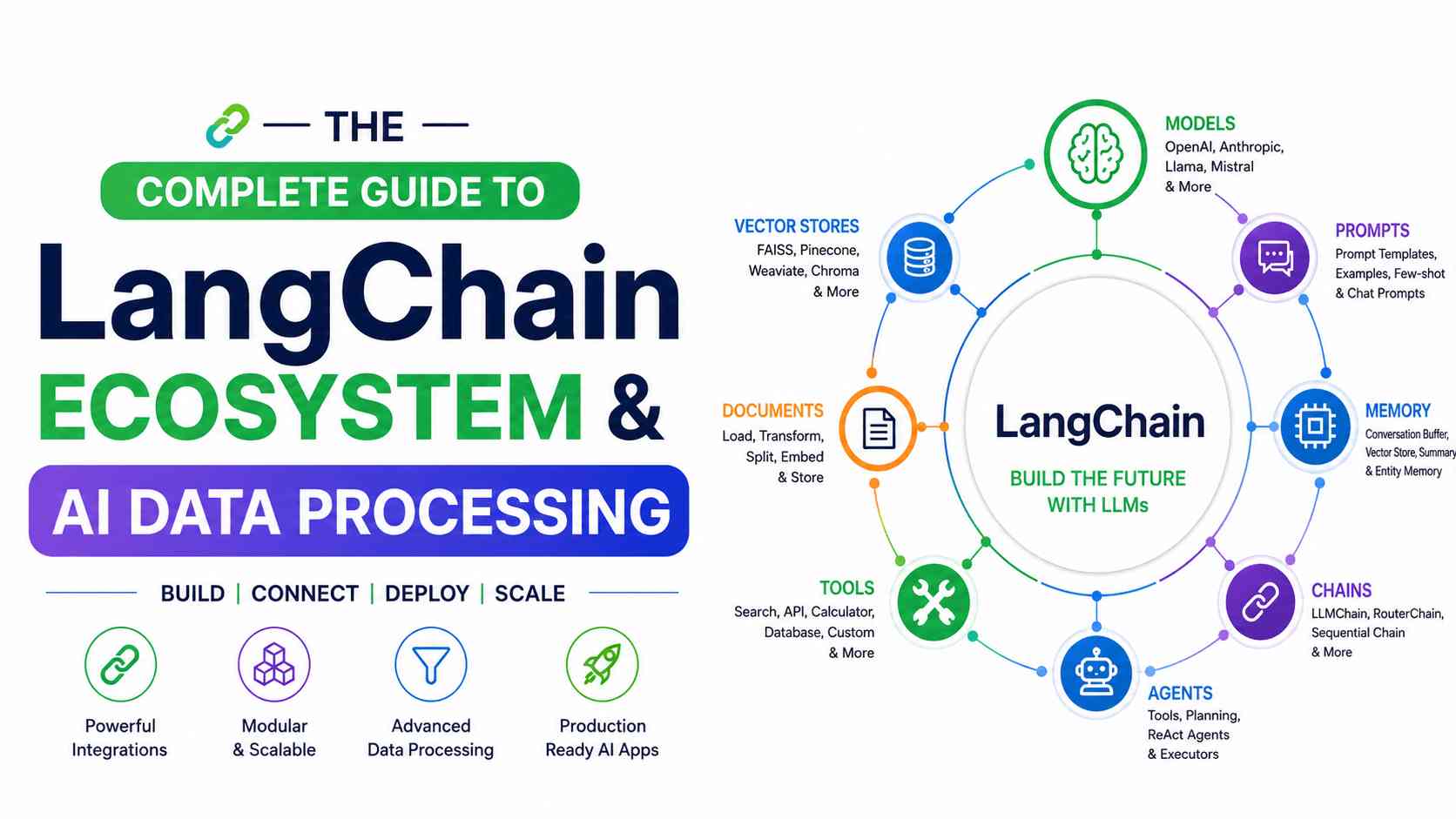
Understanding LangChain ideas is essential while preparing for an interview as an AI engineer, generative AI engineer, Python developer, or LLM engineer. In this article, we've listed 40 frequently asked LangChain interview questions categorized by experience level, plus practical solutions to help you comfortably respond to technical interviews.
LangChain Interview Questions and Answers
To make your preparation more structured, we've organized these LangChain interview questions into three sections: Freshers, Intermediate, and Advanced. Whether you're preparing for your first AI developer role or a senior LLM engineering interview, you'll find questions that match your expertise
LangChain Interview Questions for Freshers
1. What is LangChain?
LangChain is an open-source framework for developing applications using large language models (LLMs). It provides reusable components like prompt templates, memory, chains, agents, tools, retrievers, and vector database connections, which make it easy to create AI applications like chatbots, document Q&A systems, AI assistants, and RAG apps.
2. Why do we use LangChain?
We use LangChain to build AI applications powered by large language models (LLMs). It simplifies connecting models with external data sources, APIs, databases, and tools while managing prompts, memory, agents, and workflows. This enables developers to create intelligent chatbots, RAG applications, AI assistants, and automated business processes faster and more efficiently.
3. What are the main components of LangChain?
The core components include:
- LLMs and Chat Models
- Prompt Templates
- Chains
- Agents
- Tools
- Memory
- Retrievers
- Document Loaders
- Text Splitters
- Vector Stores
- Output Parsers
- LCEL (LangChain Expression Language)
Each component has a specific responsibility, making applications modular and reusable.
4. What is a Chain in LangChain?
A Chain connects multiple operations into a single workflow. For example, a prompt template creates a prompt, the LLM processes it, and an output parser formats the result. Chains help automate multi-step tasks without needing to write repetitive code.
User Question → Prompt → LLM → Output Parser → Final Response
5. What is PromptTemplate?
PromptTemplate allows developers to create dynamic prompts using variables instead of hardcoding text. It improves prompt reusability and consistency.
from langchain_core.prompts import ChatPromptTemplate
prompt = ChatPromptTemplate.from_template(
"Explain {topic} in simple terms."
)
prompt.invoke({"topic":"LangChain"})
6. What is the difference between an LLM and a Chat Model?
An LLM typically receives a single text prompt and produces a generated text, but a Chat Model works on structured messages such as system, human, and AI. Chat models are more suited to conversational AI since they maintain conversational structure and offer additional features such as tool calling.
7. What is Memory in LangChain?
Memory stores a conversation history, allowing the model to recollect previous interactions. Without memory, each request is handled individually. Buffer memory, summary memory, and window memory are examples of memory methods that vary depending on how much context is required.
8. What is an Agent?
An Agent is an intelligent decision-maker who decides which tool or action to do based on the user's request. Unlike a chain, which has preset stages, an agent creates its workflow dynamically at runtime.
Example: If a user asks, "What's the weather in Delhi, and summarize today's AI news?" the agent may call both a weather API and a news search tool before generating the final response.
9. What are Tools in LangChain?
Tools allow LangChain to interact with external systems. They enable LLMs to perform tasks beyond text generation.
Common tools include:
- Web Search
- Calculator
- Python REPL
- SQL Database
- REST APIs
- Custom Business APIs
10. What are Embeddings?
Embeddings turn text into numerical vectors that represent semantic meaning. Similar text generates similar vectors, enabling semantic search rather than keyword matching. Embeddings are a vital part of retrieval-augmented generation (RAG).
11. What is a Vector Database?
A vector database stores embeddings and performs similarity searches efficiently. Instead of searching for exact words, it retrieves documents with similar meanings.
Popular vector databases include:
- Chroma
- FAISS
- Pinecone
- Weaviate
- Milvus
- Qdrant
12. What is a Retriever?
A Retriever retrieves the most relevant documents from a vector database depending on a user query. These documents are then forwarded to the LLM as extra background, which improves the accuracy of replies in RAG applications.
13. What is LCEL (LangChain Expression Language)?
LCEL is a modern method for creating LangChain pipelines. It uses the Runnable interface to combine prompts, models, retrievers, and output parsers into clean, understandable workflows. LCEL is more modular and is the preferred method in current versions of LangChain.
14. What is a Document Loader?
A Document Loader imports data from a number of sources into LangChain. Sources supported include PDFs, Word documents, webpages, CSV files, HTML pages, Notion, Google Drive, and databases. The loaded material is then broken down into pieces and indexed for retrieval.
15. What is an Output Parser?
An Output Parser converts the raw answer from an LLM into a structured representation such as JSON, Python objects, or Pydantic models. This makes the output easier to evaluate and incorporate into applications, particularly when downstream systems require structured data.
LangChain Interview Questions for Intermediate Developers
16. What is Retrieval-Augmented Generation (RAG)?
The Retrieval-Augmented Generation (RAG) AI architecture combines a retriever and an LLM. Instead of relying exclusively on the model's training data, it retrieves relevant articles from a knowledge repository and inserts them into the prompt before creating a response. This lowers hallucinations and allows the model to provide answers based on current or private data.
Example: A company chatbot retrieves answers from internal PDFs rather than relying only on GPT's knowledge.
Interview Tip: Mention the RAG pipeline: Load → Split → Embed → Store → Retrieve → Generate.
17. Why are Text Splitters important in LangChain?
Large language models have context window limitations; therefore, large documents must be broken into smaller sections before embedding. Text splitters keep context while dividing it into comprehensible bits, enhancing retrieval quality and minimizing token usage.
Popular splitters include:
- RecursiveCharacterTextSplitter
- CharacterTextSplitter
- TokenTextSplitter
- MarkdownHeaderTextSplitter
18. What is the difference between Chroma, FAISS, and Pinecone?
These are popular vector databases used with LangChain.
| Database | Best For |
|---|---|
| Chroma | Local development and prototypes |
| FAISS | Fast local similarity search |
| Pinecone | Cloud-based production applications |
Interview Tip: Mention that FAISS is an indexing library, while Pinecone is a managed cloud service.
19. Explain the RAG pipeline.
A standard RAG pipeline consists of:
- Load documents
- Split documents into chunks
- Generate embeddings
- Store embeddings in a vector database
- Retrieve relevant chunks based on a user query
- Pass the retrieved context to the LLM
- Generate the final answer
This architecture enables LLMs to answer questions using external knowledge instead of relying only on pre-trained data.
20. What is Conversation Memory, and when should you use it?
Conversation Memory allows chatbots to remember previous interactions, creating a more natural conversational experience. Depending on the use case, developers can choose the following:
- Buffer Memory
- Window Memory
- Summary Memory
- Token Buffer Memory
For long-running conversations, Summary Memory is often preferred because it compresses older messages while preserving important context.
21. What is RunnableSequence in LangChain?
RunnableSequence is a feature of LCEL that allows developers to merge many Runnable components into a simplified process. The | operator allows developers to combine prompts, models, retrievers, and output parsers rather than standard chains.
Example Flow:
Prompt → Chat Model → Output Parser
This approach results in cleaner, more maintainable code.
22. What are Callbacks in LangChain?
Callbacks allow developers to monitor and customize different stages of LangChain execution. They are useful for:
- Logging prompts
- Measuring latency
- Tracking token usage
- Debugging workflows
- Monitoring tool execution
Callbacks are especially valuable in production systems for observability and performance analysis.
23. What is LangSmith?
LangSmith is LangChain's observation and assessment platform. It uses statistics and analytics to assist developers in tracking program execution, inspecting prompts, debugging chains, analyzing performance, and evaluating AI applications.
Key features include the following:
- Execution tracing
- Prompt debugging
- Dataset evaluation
- Performance monitoring
- Experiment comparison
Interview Tip: Explain that LangSmith is to LangChain what application performance monitoring tools are to traditional software.
24. How can you optimize the performance of a LangChain application?
Common optimization techniques include:
- Choosing efficient embedding models
- Optimizing chunk size and overlap
- Caching LLM responses
- Reducing unnecessary prompt tokens
- Using asynchronous execution
- Streaming responses
- Selecting faster vector databases
- Limiting retrieved documents (
top_k)
A combination of these strategies improves both speed and cost efficiency.
25. What are the best practices for Prompt Engineering in LangChain?
Answer:
Effective prompt engineering includes:
- Writing clear instructions
- Defining the model's role
- Using delimiters
- Providing examples (few-shot prompting)
- Requesting structured outputs
- Keeping prompts concise
- Testing multiple prompt variations
Well-designed prompts significantly improve response accuracy and consistency.
Advanced LangChain Interview Questions
26. What is LangGraph, and how does it differ from LangChain?
LangGraph is an extension of LangChain that allows you to create stateful, multi-step, and agentic workflows. While LangChain works well for linear pipelines, LangGraph supports branching logic, loops, checkpoints, and permanent state, making it perfect for complicated AI applications.
27. What are Multi-Agent Systems?
A multi-agent system is a setup of several specialized AI agents that work together to execute complicated tasks. Each agent is responsible for a certain task, such as research, coding, summary, or validation.
Example: One agent searches the web, another analyzes the data, and a third writes the final report.
This architecture improves scalability and task specialization.
28. What is Tool Calling?
Tool Calling allows an LLM to invoke external functions or APIs instead of generating responses purely from its internal knowledge. Examples include querying databases, calling weather APIs, performing calculations, or searching the web. This capability makes AI applications more accurate and actionable.
29. What is the Model Context Protocol (MCP)?
The Model Context Protocol (MCP) is an open standard for securely connecting AI models to external tools, data sources, and applications. It provides a standard interface for accessing files, databases, APIs, and corporate systems, eliminating the need for model-specific integrations.
30. What are Structured Outputs?
Structured Outputs guarantee that an LLM offers data in a certain format, such as JSON or a schema-defined object. This is particularly useful when AI replies must be ingested by subsequent apps or APIs.
Using structured outputs decreases processing mistakes while increasing dependability.
31. What is Streaming in LangChain?
Streaming allows LLM responses to be provided token by token rather than waiting for the whole response to finish. This increases the perceived responsiveness of AI systems and improves the user experience, particularly for extended replies.
32. Why use Asynchronous Execution?
Asynchronous execution allows numerous LLM calls, API requests, or retrieval activities to occur simultaneously instead of sequentially. This lowers latency and increases throughput, particularly in applications with several users or complicated workflows.
33. How do you secure a LangChain application?
Security best practices include:
- Validating user inputs
- Preventing prompt injection attacks
- Encrypting API keys
- Applying role-based access control (RBAC)
- Sanitizing retrieved documents
- Monitoring tool usage
- Limiting API permissions
- Logging sensitive operations
Security should be considered throughout the development lifecycle, especially for enterprise deployments.
34. How can LangChain applications be scaled for production?
Production scaling strategies include:
- Using managed vector databases
- Implementing response caching
- Deploying microservices
- Load balancing
- Horizontal scaling
- Background task processing
- Observability with LangSmith
- Monitoring token usage and latency
A well-architected deployment ensures reliability and cost efficiency.
35. How do you evaluate a LangChain application?
Evaluation goes beyond checking if an answer "looks good." Common evaluation metrics include:
- Accuracy
- Relevance
- Faithfulness (avoiding hallucinations)
- Latency
- Cost
- User satisfaction
- Retrieval precision
- Context recall
Tools like LangSmith and custom evaluation datasets help automate this process.
LangChain Coding Interview Questions with Solutions
36. Create a PromptTemplate that explains any topic
Problem Statement
Write a LangChain program that accepts a topic and generates a beginner-friendly explanation.
Solution
from langchain_core.prompts import ChatPromptTemplate
from langchain_openai import ChatOpenAI
prompt = ChatPromptTemplate.from_template(
"Explain {topic} in simple terms with an example."
)
model = ChatOpenAI(model="gpt-4.1-mini")
chain = prompt | model
response = chain.invoke({"topic": "Vector Databases"})
print(response.content)
Code Explanation
The ChatPromptTemplate creates a reusable prompt with a variable. Using LCEL (|), the prompt is connected directly to the chat model. When invoke() is called, LangChain replaces {topic} with the provided value and sends the completed prompt to the model.
Expected Output
A simple explanation of vector databases with a practical example.
37. Build a simple LCEL Runnable pipeline
Problem Statement
Create a pipeline that summarizes any paragraph.
Solution
from langchain_core.prompts import ChatPromptTemplate
from langchain_core.output_parsers import StrOutputParser
from langchain_openai import ChatOpenAI prompt = ChatPromptTemplate.from_template(
"Summarize the following text in three bullet points:\n\n{text}"
)
chain = prompt | ChatOpenAI(model="gpt-4.1-mini") | StrOutputParser()
result = chain.invoke({
"text": "LangChain is an open-source framework..."
})
Code Explanation
The pipeline consists of three stages:
- Prompt
- Chat Model
- Output Parser
The output parser converts the model response into plain text.
Expected Output
Three concise bullet points summarizing the supplied text.
38. Build a basic RAG application
Problem Statement
Create a simple Retrieval-Augmented Generation (RAG) pipeline using Chroma.
Solution
from langchain_community.document_loaders import TextLoader
from langchain_text_splitters import RecursiveCharacterTextSplitter
from langchain_openai import OpenAIEmbeddings
from langchain_chroma import Chroma
loader = TextLoader("knowledge.txt") documents = loader.load()
splitter = RecursiveCharacterTextSplitter( chunk_size=500, chunk_overlap=50 )
chunks = splitter.split_documents(documents)
db = Chroma.from_documents(
chunks, OpenAIEmbeddings()
)
retriever = db.as_retriever()
results = retriever.invoke("What is LangChain?")
This example demonstrates the core RAG workflow:
- Load documents
- Split into chunks
- Generate embeddings
- Store vectors
- Retrieve relevant content
A production application would pass the retrieved documents to an LLM to generate the final answer.
Expected Output
The retriever returns document chunks relevant to the query.
39. Build a chatbot with conversation memory
Problem Statement
Create a chatbot that remembers previous messages.
Solution
from langchain.memory import ConversationBufferMemory
memory = ConversationBufferMemory(return_messages=True )
memory.save_context( {"input": "Hi"}, {"output": "Hello!"} )
memory.save_context( {"input": "My name is Lokesh"}, {"output": "Nice to meet you."} )
print(memory.load_memory_variables({}))
Code Explanation
The memory object stores conversation history so future interactions can reference earlier messages.
Note: Newer LangChain applications increasingly use LangGraph memory for production-grade conversational state, but understanding classic memory classes is still valuable for interviews.
Expected Output
The conversation history is returned instead of only the latest message.
40. Build an AI Agent that can use tools
Problem Statement
Create an AI agent capable of calling external tools.
Solution
from langchain.agents import create_tool_calling_agent
#Define tools here
# Initialize chat model
# Create agent
# Execute user query
Code Explanation
A modern LangChain agent:
- Understands the user's request
- Decides which tool to call
- Executes the tool
- Uses the result to generate the final answer
Unlike traditional chains, the execution path is determined dynamically.
Expected Output
The agent invokes the appropriate tool and returns an informed response.
LangChain Interview Mistakes
Avoid these common mistakes during interviews:
- Confusing LangChain with an LLM.
- Memorizing definitions without understanding real-world use cases.
- Ignoring Retrieval-Augmented Generation (RAG).
- Not knowing the difference between Chains, Agents, and LangGraph.
- Forgetting to explain embeddings and vector databases.
- Using outdated LangChain APIs without acknowledging recent changes.
- Failing to discuss prompt engineering best practices.
- Not understanding how tools and function calling work.
- Overlooking production concerns like latency, observability, and security.
- Claiming experience without discussing a practical project.
LangChain Interview Preparation Tips
- Build at least one end-to-end RAG application.
- Practice creating prompts using LCEL.
- Learn LangGraph fundamentals for agentic workflows.
- Compare vector databases such as Chroma, FAISS, and Pinecone.
- Explore LangSmith for debugging and evaluation.
- Read the latest LangChain documentation because APIs evolve quickly.
- Practice explaining concepts aloud, not just writing code.
- Prepare a project you can discuss in detail during interviews.
Conclusion
LangChain has been recognized as one of the major frameworks for developing modern AI applications, and interview expectations have developed alongside it. Recruiters are looking for applicants who understand quick engineering, RAG architectures, vector databases, agentic processes, and production concerns.
Rather than memorizing answers, spend time developing real-world projects like a document Q&A assistant, a customer support chatbot, or an AI research assistant. These projects will allow you to defend your decisions and demonstrate practical experience during interviews persuasively. By understanding the questions in this guide and using them in real-world scenarios, you'll be well prepared for interviews ranging from entry-level AI to senior LLM engineering positions.
People are also reading:
- Best AI Games
- Best AI YouTube Channels
- Top Free AI Tools
- AI Regulations in the World
- Best AI Marketing Tools
- Best AI Agent Builders
Frequently Asked Questions (FAQs)
Q: Is LangChain difficult to learn?
No. If you're comfortable with Python and understand basic LLM concepts, you can learn the fundamentals of LangChain in a few weeks through hands-on projects.
Q: Is LangChain still in demand?
Yes. Many organizations are using LangChain to build AI assistants, RAG systems, and enterprise automation tools, making these skills highly relevant.
Q: Do I need Python before learning LangChain?
Python is strongly recommended because most LangChain examples, integrations, and community resources use it. JavaScript/TypeScript support is also available.
Q: What is the difference between LangChain and LangGraph?
LangChain focuses on composing LLM applications, while LangGraph is designed for stateful, branching, and multi-agent workflows.
Q: What's the best way to prepare for a LangChain interview?
Focus on building practical projects, understanding the RAG pipeline, learning LCEL and LangGraph basics, and practicing explanations of your design decisions.